
Features
What Vflin does
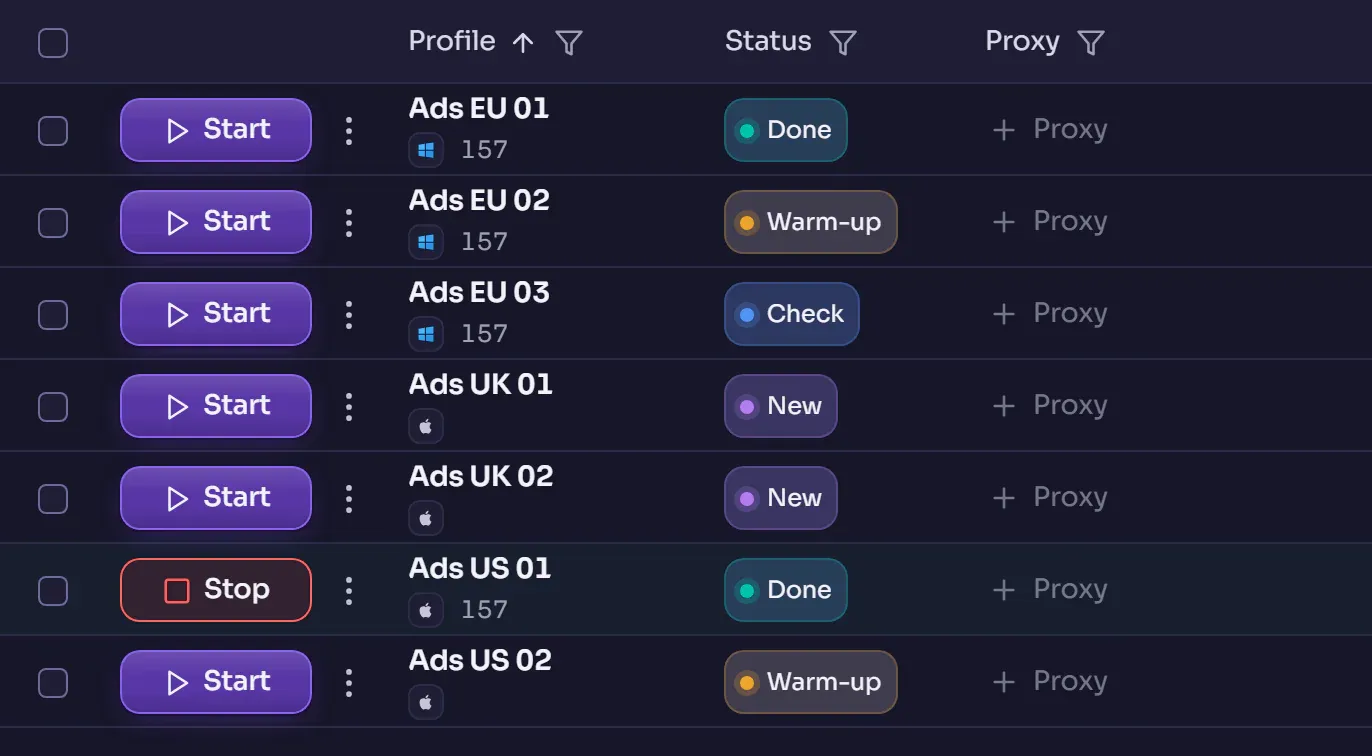
Below, a shot of the program's window; under it, what stands behind each of its sections and what shows it.
Where to start
213
API methods — each with a CLI command and an MCP tool
One action — three ways in
The app's window, your script, the command line and an AI agent all work through one local API. CLI commands and MCP tools are built from one contract, and a check runs every command against the real program.
builtcontract · 213 / 213 / 213
Chromium
inside the profile is Chrome itself, of the version it claims
Chrome's network, not an imitation of it
The core is Chromium, so a profile's TLS, HTTP/2 and QUIC are Chrome's by construction. The claimed browser version always equals the engine's: this is checked when a profile is set up and at every launch.
builtby construction · the core is Chromium
01
Fingerprint and core
A profile's identity is assembled by rules and checked against what the core really reports.
An identity from a catalogue, not random numbers
The graphics card, the screen, the fonts and the system are chosen to agree with one another; screens are drawn by the share of real monitors on that system.
builta catalogue of devices · consistency rules
Moving to a new Chrome — with a forecast
Before the core version changes, the app shows what will change in your profiles: only the claimed version and what follows from it — as in a real Chrome update.
builtSettings → Core
The core keeps up with Chrome
Our changes are carried over to stable Chrome about once a month. Falling more than two versions behind is a red check, not a forgotten task.
builta check of the distance to stable Chrome
02
Network and proxies
A profile's exit is checked through the proxy itself, and the machine's address does not reach the page.
Proxies are connected separately and are not included in the Vflin plans shown.
WebRTC through the profile's exit
Datagrams go through a relay on this computer and the same exit as the pages; when the proxy cannot do UDP, the core answers with the exit's address itself.
measuredmachine address on the page: 0 · 22 October 2026
How the network works →Country and time zone — measured through the proxy
The app does not trust the provider's label: it measures the exit's country and time zone through the proxy itself and matches the profile's language and time zone to it.
builtthe “Add proxy” window
An exit's reputation — on a button
The check goes through the same proxy in a browser with no window, at most three times an hour. If the site did not answer, it says “not checked”, not an invented zero.
builta button by the proxy
03
A profile ready for work
A profile opens with its wallet, signed in to the service, and with a browsing history.
Of the wallets, Rabby is supported today.
A wallet once, for any profile
A wallet goes into the list once, and Rabby in the profile opens with it already there. The key stays in this computer's store, and the app reads balances through the profile's exit, not from your address.
builtthe Wallets section
A profile opens already signed in to the account
For Twitter/X, Steam and Discord, the sign-in token is kept on this computer and goes into the profile's browser at start. Nothing reads it back.
builtthe profile form
The cookie robot warms a profile up before work
Before work, a profile walks a list of sites by itself in a visible tab: you set the sites, the time on each and how many profiles go at once.
builtthe profile list → Cookie robot
04
Automation
A scenario runs across a folder of profiles on a schedule — and cannot quietly gain new rights.
A scenario on a folder, on a schedule
One scenario runs across every profile of a folder on a timer, and each profile gets its own row of data from a table.
builtAutomation → Tasks
How automation works →A scenario says up front what it may do
A scenario's rights are visible before it runs. They are checked when it is saved and again before every scheduled run.
builtAutomation → Scenarios
Synchronizer
The leading window's actions are repeated in the other selected profiles while you work by hand.
builtthe Synchronizer section
05
Agents, code and your own server
Connect your own tools so that the decision stays yours.
An agent cannot widen its own rights
The MCP mode is set by a person when the server starts, and no agent tool can change it. Without that setting, dangerous actions stay closed.
builtthe VFLIN_MCP_MODE variable
Set up MCP →Puppeteer and Playwright — on your word
A profile's CDP port is closed by default. Open it, and your Puppeteer or Playwright connects to the profile.
builtlaunching a profile with a CDP port
The cloud on your own server
The cloud part can be run on your own server: the container build, TLS and backups are described in the guide.
builtthe “Self-hosting” guide
The guide →
06
Data and the cloud
We do not ask you to take our word: what the server sees was checked by querying the database.
We say what the server sees
Someone with access to our server learns how many profiles you have and how large they are — but not their contents, cookies, fingerprint, proxy or password.
measureddatabase queries · 4 September 2026
What the server sees →The password does not leave, even at sign-in
Neither the app nor the site sends your password: only a check value derived on your device goes to the server.
builtsign-in in the app and on the site
A profile is a sealed file, not a folder
A profile is kept as an encrypted file. When the browser stops, the app seals the profile, checks that the file opens, and only then wipes the open copy.
builtstopping a profile
Try it on the free plan
Free gives 5 profiles and 10 wallets. Automation, the API, the CLI and MCP are all on it.